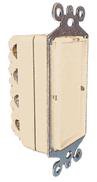
Description: The X10 PRO Phase Coupler - Passive serves as a 1:1 signal-bridge across Split-Phase Systems. The XPCP accepts X10 Controller Commands from one phase (L1), and passes (1:1) the X10 Command to the other phase (L2). The XPCP performs this function in both directions, i.e. - (L1 to L2 or L2 to L1). The XPCP's Red LED is inactive. The XPCP is NOT a filter.
Note: Installation must be performed by qualified installers only. The main breaker must be turn-off during installation. The coupler must be installed in a suitable workbox or enclosure per local code. Installation must be in accordance with all applicable codes and requirements, including, but not limited to, the National Electrical Code (NEC).
Specific Requirements: 240VAC
Split-Phase System 120/240V - L1, L2
Generally for residence 2000 Sq Ft or smaller.
Homes with an abundance of electronic devices will be served better with the increased signal strength of the XPCR Phase Coupler/Repeater vs.
using the passive XPCP 1:1 Phase Coupler.
Typical Terminology
N - refers to Neutral
A - sometimes referred to as Phase A or L1 (line 1)
B - sometimes referred to as Phase B or L2 (line 2)
Optional / Supplementary Devices & Modules:
XPPF & XPF Filters to reduce interfering noise from electronic devices.
Electrical Protocol:
Nearly all residential homes are wired SPLIT-PHASE. Each 120V Phase is NOT directly connected with the other 120V phase. If after installation,
an X10 Receiver does not respond to a remote Controller, then check to ensure that the breaker serving the X10 Receiver is on the same phase as
the Controller. If not, the breaker can be changed to the opposite phase. An alternative solution is recommended, to install a Phase Coupler for
improving remote communications throughout the home.
Installation:
1. Turn-off power at the MAIN Breaker Panel.
2. Install the XPCP into a suitable workbox or equivalent enclosure.
3. Connect N1 terminal to N2 terminal and run a WHITE wire from N1/N2 to the Neutral BUSS Bar.
4. Connect to L1 terminal to L1 breaker terminal
5. Connect to L2 terminal to L2 breaker terminal
6. Check all wires for secure connections and then turn-on Power.
7. Investing in the X10 PRO Test Equipment, XPTT/XPTR, is an excellent way to ensure that X10 Signal Strength is at the appropriate levels.
Tech Tip: See PLC Troubleshooting document, at www.x10pro.com, then select Technical Support. This literature will offer in-depth problem
solving techniques using the X10 PRO Test Equipment, Phase Couplers and Filters.